這台 ASUS X553M 開機會出現
Ignoring BGRT: invalid status 0 (expected 1)
不影響運作,但看了煩
請參考:
http://ubuntuforums.org/showthread.php?t=2264380
https://bbs.archlinux.org/viewtopic.php?id=199736
https://wiki.archlinux.org/index.php/Silent_boot
最後在核心參數加上了
quiet loglevel=3 vga=current rd.systemd.show_status=false rd.udev.log-priority=3
就清爽多了
2015年12月5日 星期六

2015年10月7日 星期三
在 ASUS X553M 安裝 openSUSE 13.2
買了一台低階筆電 ASUS X553M
安裝了 openSUSE 13.2 KDE
一切都像以往一樣熟悉...

只有在 fn + f5 , fn + f6 控制螢幕亮度時不生效
查詢 google 後也順利解決了
在 kernel 啟動參數中加上
video.use_native_backlight=1 acpi_osi=
編輯
/etc/X11/xorg.conf.d/20-intel.conf
內容為
Section "Device"
Identifier "card0"
Driver "Intel"
Option "Backlight" "intel_backlight"
BusID "PCI:0:2:0"
EndSection
20160512補充:
今日安裝Tumbleweed,核心4.5.3
依照上面的修改失敗
查到另一個
acpi_osi= acpi_backlight=native
不需要加20-intel.conf
安裝了 openSUSE 13.2 KDE
一切都像以往一樣熟悉...

只有在 fn + f5 , fn + f6 控制螢幕亮度時不生效
查詢 google 後也順利解決了
在 kernel 啟動參數中加上
video.use_native_backlight=1 acpi_osi=
編輯
/etc/X11/xorg.conf.d/20-intel.conf
內容為
Section "Device"
Identifier "card0"
Driver "Intel"
Option "Backlight" "intel_backlight"
BusID "PCI:0:2:0"
EndSection
就可以利用快速鍵控制螢幕背光了
20160512補充:
今日安裝Tumbleweed,核心4.5.3
依照上面的修改失敗
查到另一個
acpi_osi= acpi_backlight=native
不需要加20-intel.conf
2012年2月19日 星期日
忘記密碼
因為密碼常常更換,結果忘了密碼...囧
openSUSE 11.4 無法登入
還好找到了這個網頁
http://www.linuxquestions.org/questions/linux-software-2/forgot-password-suse-linux-10-a-434891/
根據 #8 的作法,還真的蠻簡單的
(這又讓我有點擔心)
1. 在開機選項(Boot option)中,加上
2. 開機後執行指令
3. 接著執行
就會提示輸入 root 密碼
4. 接著重開機
新的密碼就可以用了
(所以只要電腦離開視線1分鐘,很可能就...)
openSUSE 11.4 無法登入
還好找到了這個網頁
http://www.linuxquestions.org/questions/linux-software-2/forgot-password-suse-linux-10-a-434891/
根據 #8 的作法,還真的蠻簡單的
(這又讓我有點擔心)
1. 在開機選項(Boot option)中,加上
init=/bin/sh
2. 開機後執行指令
mount -a
3. 接著執行
passwd
就會提示輸入 root 密碼
4. 接著重開機
reboot
新的密碼就可以用了
(所以只要電腦離開視線1分鐘,很可能就...)
2010年7月17日 星期六
安裝完 openSUSE 11.3 之後
這些都是我的習慣性動作,供各位參考
剛安裝完成:
整理一下套件庫,把該新增的該修改的整理一下
習慣上我只留著 Update 會自動重新整理
Debug 和 Source 我都停用
若遇到安裝檔案找不到時
再用 zypper ref 來重新整理
關於套件庫的一些觀念可以參考:
http://help.opensuse.org/ksuseinstall/
新增的套件庫如下:
myrepo.repo
您可以用
來匯入上方的這些套件庫
或直接由網路上匯入:
接著開啟軟體管理,會有些自動加入的,就先裝一裝吧
接下來您可以繼續用圖形介面搜尋安裝
但我比較喜歡用命令行
subpixel hinting
在液晶螢幕上讓反鋸齒字型更銳利清晰
若喜歡用點陣字就不必了
這程式可能會和某些特效衝突(以前遇過,忘了)
安裝時有時會要您確認變更廠商(供應商),就是要確認這個程式以後要用這個安裝來源
安裝完後要開啟次像素顯示
KDE 和 GNOME 都有圖形介面可用
若是 LXDE 或其他桌面,可以直接
在這裡 10-sub-pixel-rgb.conf 要看您的螢幕是用那一種
可能會是 bgr, vrgb 或 vbgr
字型解析度依照您個人喜好調整
KDE 預設只有幾種選擇
若不滿意可以在 $HOME/.Xresources (通常沒這個檔案要自己產生)
自行設定
libdvdcss
播放 DVD 會用到
Chinese
習慣上我會刪除 scim 安裝 gcin
pcmanx-gtk2 是為了方便上 BBS
chinese-fonts-setting 則是我個人的字型設定檔
例如我偏好使用 Droid Sans Fallback 來顯示中文
下面是改用我的黑體字設定
刪除原本的文泉驛正黑體設定
multimedia
下面大概是每個 openSUSE 使用者必用的
安裝多媒體支援
這裡是提供 KDE 使用者的
(GNOME 或 LXDE 等其他桌面通常把 gstreamer 相關套件裝上就 OK 了(packman))
java-sun
習慣上還是使用 sun 的 java 比較不會出問題
順便把 openjdk 的移除
大部分的人會建議套件庫只要留下 oss, non-oss, update, packman 4個就OK 了
其他套件庫可以移除或停用
剛安裝好通常光碟還在,您可以這時將光碟的優先順序調高(預設都是 99)
例如調成 98 (數字愈小,愈優先使用)
這時來安裝一些其他在光碟中的套件會快速方便許多
例如我要安裝 kernel-devel gcc make 這些東西來安裝 nvidia 驅動程式
您可以參考之前的文章
完成的桌面:
您可能會遇到的問題:
1. 在某些情況下,筆記型電腦的網路仍使用傳統 ifup 方式設定
請在 YaST 中改成 NetworkManager 方式控制
2. 第一次開機 KDE 的 NetworkManager 是壞的,
得再重新登入一次才能連線
3. 觸控板的 Tap (在板上點擊)可能是停用的
請在控制中心啟用
KDE GNOME LXDE 都有圖形介面可用
若無法儲存觸控板設定
試著在進入桌面時自動執行
推薦網站:
http://omgsuse.com/
提醒:
在 http://software.opensuse.org 搜尋套件現在會預設排除 home project 和 debug 套件
小技巧:
命令行加入 obs (openSUSE Build Service) 套件庫的簡寫法
請參考:
http://opensuse-community.org/Welcome_to_openSUSE-Community.org
剛安裝完成:
 |
| 寄件者 openSUSE 11.3 |
整理一下套件庫,把該新增的該修改的整理一下
 |
| 寄件者 openSUSE 11.3 |
習慣上我只留著 Update 會自動重新整理
Debug 和 Source 我都停用
若遇到安裝檔案找不到時
再用 zypper ref 來重新整理
關於套件庫的一些觀念可以參考:
http://help.opensuse.org/ksuseinstall/
新增的套件庫如下:
myrepo.repo
[download.videolan.org-SuSE]
name=VideoLan Repository
enabled=1
autorefresh=0
baseurl=http://download.videolan.org/pub/videolan/vlc/SuSE/11.3/
path=/
type=rpm-md
keeppackages=0

[packman.inode.at-suse]
name=Packman Repository
enabled=1
autorefresh=0
baseurl=http://packman.inode.at/suse/11.3/
path=/
type=rpm-md
keeppackages=0

[subpixel]
name=subpixel
enabled=1
autorefresh=0
baseurl=http://opensuse-community.org/subpixel/openSUSE_11.3
path=/
type=rpm-md
keeppackages=0

[swyear]
name=swyear
enabled=1
autorefresh=0
baseurl=http://download.opensuse.org/repositories/home:/swyear/openSUSE_11.3
path=/
type=rpm-md
keeppackages=0
您可以用
# zypper ar myrepo.repo
來匯入上方的這些套件庫
或直接由網路上匯入:
# zypper ar http://dl.dropbox.com/u/6331820/myrepo.repo
接著開啟軟體管理,會有些自動加入的,就先裝一裝吧
 |
| 寄件者 openSUSE 11.3 |
接下來您可以繼續用圖形介面搜尋安裝
但我比較喜歡用命令行
subpixel hinting
在液晶螢幕上讓反鋸齒字型更銳利清晰
若喜歡用點陣字就不必了
這程式可能會和某些特效衝突(以前遇過,忘了)
安裝時有時會要您確認變更廠商(供應商),就是要確認這個程式以後要用這個安裝來源
# zypper in --from subpixel freetype2-feature-subpixel-hinting
正在建立套件庫 'VideoLan Repository' 的快取 [完成]
正在建立套件庫 'Packman Repository' 的快取 [完成]
正在建立套件庫 'subpixel' 的快取 [完成]
正在建立套件庫 'swyear' 的快取 [完成]
正在載入套件庫資料...
讀取已安裝的套件...
正在解決套件相依性...

問題: freetype2-feature-subpixel-hinting-2.4.0-999.subpixel.19.1.i586 需要 libfreetype6 = 2.4.0-999.subpixel.19.1,但無法提供此需求
無法安裝的提供者: libfreetype6-2.4.0-999.subpixel.19.1.i586[subpixel]
解決方案 1:安裝 libfreetype6-2.4.0-999.subpixel.19.1.i586 (並變更廠商)
openSUSE  -->  obs://10.8.0.1/subpixel
解決方案 2:請勿安裝 freetype2-feature-subpixel-hinting-2.4.0-999.subpixel.19.1.i586
解決方案 3:藉由忽略某些它的相依性破壞 freetype2-feature-subpixel-hinting

使用'數字'選擇上列的解決方法,或取消(使用'c') [1/2/3/c] (c): 1
正在解析相依性...
正在解決套件相依性...

將會安裝下列新的套件:
freetype2-feature-subpixel-hinting

下列套件將會升級:
libfreetype6

下列套件將會變更供應商:
libfreetype6  openSUSE -> obs://10.8.0.1/subpixel


1  套件將升級, 1  新的, 1  將變更供應商.
全部下載大小: 355.0 KiB。 完成操作後,將釋出 120.0 KiB。
要繼續嗎? [y/n/?] (y): y
安裝完後要開啟次像素顯示
KDE 和 GNOME 都有圖形介面可用
 |
| 寄件者 openSUSE 11.3 |
 |
| 寄件者 openSUSE 11.3 |
若是 LXDE 或其他桌面,可以直接
# ln -s /etc/fonts/conf.avail/10-sub-pixel-rgb.conf /etc/fonts/conf.d/
# fc-cache
在這裡 10-sub-pixel-rgb.conf 要看您的螢幕是用那一種
可能會是 bgr, vrgb 或 vbgr
字型解析度依照您個人喜好調整
KDE 預設只有幾種選擇
若不滿意可以在 $HOME/.Xresources (通常沒這個檔案要自己產生)
自行設定
Xft.dpi: 112.0
libdvdcss
播放 DVD 會用到
# zypper in --from 'VideoLan Repository' libdvdcss
正在載入套件庫資料...
讀取已安裝的套件...
正在解決套件相依性...

將會安裝下列新的套件:
libdvdcss

1  新套件將被安裝.
全部下載大小: 18.0 KiB。 完成操作後,將增加 34.0 KiB 的使用。
要繼續嗎? [y/n/?] (y): y
Chinese
習慣上我會刪除 scim 安裝 gcin
pcmanx-gtk2 是為了方便上 BBS
chinese-fonts-setting 則是我個人的字型設定檔
例如我偏好使用 Droid Sans Fallback 來顯示中文
# zypper in gcin pcmanx-gtk2 chinese-fonts-setting -scim
正在載入套件庫資料...
讀取已安裝的套件...
正在解決套件相依性...

問題: scim-tables-0.5.8-257.1.i586 需要 libscim-1.0.so.8,但無法提供此需求
解決方案 1:下列行動將被執行:
反安裝 scim-tables-0.5.8-257.1.i586
反安裝 plasma-addons-scim-4.4.4-1.3.i586
反安裝 mlterm-scim-2.9.4-7.2.i586
反安裝 scim-bridge-0.4.15-121.1.i586
反安裝 scim-chewing-0.3.3-6.1.i586
反安裝 scim-input-pad-0.1.1-279.1.i586
反安裝 scim-m17n-0.2.2-235.1.i586
反安裝 scim-pinyin-0.5.91.20060705-272.1.i586
反安裝 scim-qtimm-0.9.4-278.1.i586
反安裝 scim-bridge-gtk-0.4.15-121.1.i586
反安裝 scim-bridge-qt-0.4.15-121.1.i586
反安裝 scim-tables-zh-0.5.8-257.1.i586
解決方案 2:保留 scim-1.4.7-174.1.i586
解決方案 3:藉由忽略某些它的相依性破壞 scim-tables

使用'數字'選擇上列的解決方法,或取消(使用'c') [1/2/3/c] (c): 1
正在解析相依性...
正在解決套件相依性...

將會安裝下列新的套件:
chinese-fonts-setting gcin pcmanx-gtk2

下列套件將會被移除:
mlterm-scim plasma-addons-scim scim scim-bridge scim-bridge-gtk
scim-bridge-qt scim-chewing scim-input-pad scim-m17n scim-pinyin scim-qtimm
scim-tables scim-tables-zh

3  新套件將被安裝, 13  將移除.
全部下載大小: 1.6 MiB。 完成操作後,將釋出 15.6 MiB。
要繼續嗎? [y/n/?] (y): y
下面是改用我的黑體字設定
刪除原本的文泉驛正黑體設定
# ln -s /etc/fonts/conf.avail/57-hei.conf /etc/fonts/conf.d/
# rm /etc/fonts/conf.d/57-wqy-zenhei.conf
# fc-cache
multimedia
下面大概是每個 openSUSE 使用者必用的
安裝多媒體支援
這裡是提供 KDE 使用者的
(GNOME 或 LXDE 等其他桌面通常把 gstreamer 相關套件裝上就 OK 了(packman))
# zypper in ffmpeg flash-player libxine1-codecs w32codec-all k3b-codecs lame
正在載入套件庫資料...
讀取已安裝的套件...
'flash-player' 已經安裝。
No update candidate for 'flash-player-10.1.53.64-2.1.1.i586'. The highest available version is already installed.
'libxine1-codecs' 已經安裝。
No update candidate for 'libxine1-codecs-1.1.18.1-2.pm.41.1.i586'. The highest available version is already installed.
正在解決套件相依性...

問題: k3b-codecs-2.0.0-1.pm.2.7.i586 需要 k3b = 2.0.0,但無法提供此需求
無法安裝的提供者: k3b-2.0.0-1.pm.2.7.i586[packman.inode.at-suse]
解決方案 1:安裝 k3b-2.0.0-1.pm.2.7.i586 (並變更廠商)
openSUSE  -->  http://packman.links2linux.de
解決方案 2:請勿安裝 k3b-codecs-2.0.0-1.pm.2.7.i586
解決方案 3:藉由忽略某些它的相依性破壞 k3b-codecs

使用'數字'選擇上列的解決方法,或取消(使用'c') [1/2/3/c] (c): 1
正在解析相依性...
正在解決套件相依性...

將會安裝下列新的套件:
ffmpeg k3b-codecs lame libavdevice52 libavfilter1 libavformat52 libjack0
libmad0 libstdc++33 libswscale0 w32codec-all

下列套件將會升級:
k3b

下列套件將會變更供應商:
k3b  openSUSE -> http://packman.links2linux.de


1  套件將升級, 11  新的, 1  將變更供應商.
全部下載大小: 21.2 MiB。 完成操作後,將增加 51.2 MiB 的使用。
要繼續嗎? [y/n/?] (y): y
java-sun
習慣上還是使用 sun 的 java 比較不會出問題
順便把 openjdk 的移除
# zypper in java-1_6_0-sun-plugin -java-1_6_0-openjdk
正在載入套件庫資料...
讀取已安裝的套件...
正在解決套件相依性...

問題: java-1_6_0-openjdk-plugin-1.6.0.0_b17-7.3.i586 需要 java-1_6_0-openjdk = 1.6.0.0_b17-7.3,但無法提供此需求
解決方案 1:反安裝 java-1_6_0-openjdk-plugin-1.6.0.0_b17-7.3.i586
解決方案 2:保留 java-1_6_0-openjdk-1.6.0.0_b17-7.3.i586
解決方案 3:藉由忽略某些它的相依性破壞 java-1_6_0-openjdk-plugin

使用'數字'選擇上列的解決方法,或取消(使用'c') [1/2/3/c] (c): 1
正在解析相依性...
正在解決套件相依性...

將會安裝下列新的套件:
java-1_6_0-sun java-1_6_0-sun-plugin

下列套件將會被移除:
java-1_6_0-openjdk java-1_6_0-openjdk-plugin

2  新套件將被安裝, 2  將移除.
全部下載大小: 22.5 MiB。 完成操作後,將增加 4.0 MiB 的使用。
要繼續嗎? [y/n/?] (y): y
大部分的人會建議套件庫只要留下 oss, non-oss, update, packman 4個就OK 了
其他套件庫可以移除或停用
剛安裝好通常光碟還在,您可以這時將光碟的優先順序調高(預設都是 99)
例如調成 98 (數字愈小,愈優先使用)
這時來安裝一些其他在光碟中的套件會快速方便許多
例如我要安裝 kernel-devel gcc make 這些東西來安裝 nvidia 驅動程式
您可以參考之前的文章
完成的桌面:
 |
| 寄件者 openSUSE 11.3 |
您可能會遇到的問題:
1. 在某些情況下,筆記型電腦的網路仍使用傳統 ifup 方式設定
請在 YaST 中改成 NetworkManager 方式控制
 |
| 寄件者 openSUSE 11.3 |
2. 第一次開機 KDE 的 NetworkManager 是壞的,
得再重新登入一次才能連線
3. 觸控板的 Tap (在板上點擊)可能是停用的
請在控制中心啟用
 |
| 寄件者 openSUSE 11.3 |
KDE GNOME LXDE 都有圖形介面可用
若無法儲存觸控板設定
試著在進入桌面時自動執行
synclient TapButton1=1 TapButton2=2
推薦網站:
http://omgsuse.com/
提醒:
在 http://software.opensuse.org 搜尋套件現在會預設排除 home project 和 debug 套件
 |
| 寄件者 openSUSE 11.3 |
小技巧:
命令行加入 obs (openSUSE Build Service) 套件庫的簡寫法
zypper ar obs://home:swyear:ibus/openSUSE_11.3 ibus
正在新增套件庫 'ibus' [完成]
已成功新增套件庫 'ibus'
已啟用: 是
自動重新整理: 否
URI: http://download.opensuse.org/repositories/home:/swyear:/ibus/openSUSE_11.3
請參考:
http://opensuse-community.org/Welcome_to_openSUSE-Community.org
2010年6月26日 星期六
openSUSE 11.3 rc1 測試(2)
1. 提醒:在正式版本釋出前,最好不要把他當成工作平台,有許多的套件庫可能還沒準備好
像是 nvidia 專利的驅動程式套件庫,packman 套件庫有些套件好像也還找不到
請要使用的同好要抱著測試的心態
2. 在 11.3 RELEASE NOTES 中有一段:
看不懂沒關係,遇到問題照著做就是了
雖然 nvidia 的套件庫還沒準備好,但是可以自行到 nvidia 網站下載來安裝
要先準備好 kernel-devel, gcc, make
驅動程式和編譯環境都準備好後,重開機
在開機畫面的指令行中輸入
停用 KMS 並進入 runlevel 3
用 root 登入,切換到 nvidia 驅動程式目錄執行
就可以順利安裝
接著執行
用 Tab 空白鍵,以及上下左右鍵控制,找到
系統->sysconfig 編輯器->kernel->將 NO_KMS_IN_INITRD 改成 yes
重新開機,就可以使用 nvidia 的專利驅動程式
(以後用 nvidia 套件庫安裝 rpm 不知道會不會這麼麻煩)
3. /etc/X11/xorg.conf 在 11.2 就已經不用了
所以,我們的好朋友 sax2 在 11.3 也正式功成身退...
4. 在這一版(rc1)中,還要再自行安裝 hal 這個套件,不然電源管理、usb 隨身碟之類的聽說都不能用(根據 Most Annoying Bug)
像是 nvidia 專利的驅動程式套件庫,packman 套件庫有些套件好像也還找不到
請要使用的同好要抱著測試的心態
2. 在 11.3 RELEASE NOTES 中有一段:
使用 KMS (Kernel Mode Setting) 初始化顯示卡
在 openSUSE 11.3 我們已為 Intel, ATI 和 NVIDIA 顯示卡切換到 KMS,這是我們的預設值。
若您在 KMS 驅動程式支援(intel, radeon, nouveau)遇到問題,可以在核心開機指令行加上nomodeset 來停用 KMS。要永久設定此參數,請將他加到/boot/grub/menu.lst 的核心指令行中。此選項會確認相對應的
核心模組(intel, radeon, nouveau)在initrd 載入時會使用modeset=0 ,也就是說,停用 KMS。
在少數情況下,當從initrd 載入 DRM 模組時會產生問題,我們
也可以完全在initrd 停止載入 DRM 模組。要這樣做的話,用 YaST
設定 sysconfig 變數NO_KMS_IN_INITRD 為yes ,
完成後會重新產生initrd ,接著請您重新開機。
在 Intel 顯示卡不用 KMS 的話,X伺服器會回歸到fbdev 驅動程式
(intel 驅動程式只支援 KMS)。在 ATI 當下主流的 GPU 顯示卡則會回歸使用radeonhd 。在 NVIDIA 顯示卡沒有 KMS 則會使用nv 驅動
程式(nouveau 驅動程式只支援 KMS)。
看不懂沒關係,遇到問題照著做就是了
雖然 nvidia 的套件庫還沒準備好,但是可以自行到 nvidia 網站下載來安裝
要先準備好 kernel-devel, gcc, make
# zypper in kernel-devel gcc make
驅動程式和編譯環境都準備好後,重開機
在開機畫面的指令行中輸入
nomodeset 3
停用 KMS 並進入 runlevel 3
用 root 登入,切換到 nvidia 驅動程式目錄執行
# sh NVIDIA-Linux-******.run
就可以順利安裝
接著執行
# yast
用 Tab 空白鍵,以及上下左右鍵控制,找到
系統->sysconfig 編輯器->kernel->將 NO_KMS_IN_INITRD 改成 yes
重新開機,就可以使用 nvidia 的專利驅動程式
(以後用 nvidia 套件庫安裝 rpm 不知道會不會這麼麻煩)
3. /etc/X11/xorg.conf 在 11.2 就已經不用了
所以,我們的好朋友 sax2 在 11.3 也正式功成身退...
4. 在這一版(rc1)中,還要再自行安裝 hal 這個套件,不然電源管理、usb 隨身碟之類的聽說都不能用(根據 Most Annoying Bug)
# zypper in hal; /sbin/insserv haldaemon
2009年1月6日 星期二
看數位電視
 |
| 寄件者 openSUSE 11.1 |
在便利商店看到數位電視棒,長這個樣子:

中文名稱叫作"廣寰數位電視棒 全民搶鮮版"型號是 DVB-T 395U
心中不知道在想些什麼,竟然就買了下來
(openSUSE 盒裝版如果也在便利商店賣應該也會賣得不錯)
果然不出意料,插上 usb 之後完全沒反應(後悔已經來不及了)
先看看偵測到了什麼
# lsusb
Bus 006 Device 002: ID 0b05:1712 ASUSTek Computer, Inc. BT-183 Bluetooth 2.0+EDR adapter
Bus 006 Device 001: ID 1d6b:0001 Linux Foundation 1.1 root hub
Bus 002 Device 001: ID 1d6b:0001 Linux Foundation 1.1 root hub
Bus 001 Device 001: ID 1d6b:0001 Linux Foundation 1.1 root hub
Bus 007 Device 006: ID 0bda:0158 Realtek Semiconductor Corp. Mass Stroage Device
Bus 007 Device 003: ID 04f2:b029 Chicony Electronics Co., Ltd USB 2.0 1.3M UVC Webcam
Bus 007 Device 001: ID 1d6b:0002 Linux Foundation 2.0 root hub
Bus 005 Device 004: ID 08ff:1600 AuthenTec, Inc. AES1600
Bus 005 Device 001: ID 1d6b:0001 Linux Foundation 1.1 root hub
Bus 004 Device 003: ID 04fc:0003 Sunplus Technology Co., Ltd CM1092 Optical Scroller Mouse
Bus 004 Device 001: ID 1d6b:0001 Linux Foundation 1.1 root hub
Bus 003 Device 002: ID 1b80:e39b
Bus 003 Device 001: ID 1d6b:0002 Linux Foundation 2.0 root hub
其中 1b80:e39b 這個裝置是插上 DVB-T 395U 後才發現的
通常我們可以 google 1b80:e39b 來察看相關訊息
卻沒發現什麼東西
改用 kworld DVB-T 395U linux 查詢,收穫可豐富了
您可以連到(連來連去)下面這些地方
http://www.mail-archive.com/linuxtv-commits@linuxtv.org/msg01795.html
http://video4linux.org/browser/linux/drivers/media/dvb/dvb-usb?rev=9785%3A6a9d064fe0ee
http://linuxtv.org/hg/v4l-dvb
http://linuxtv.org/hg/v4l-dvb/rev/14ca056ed533dae6147aeb83a9334cc38f93d7ba
http://www.mail-archive.com/linuxtv-commits@linuxtv.org/msg01799.html
http://linuxtv.org/hg/v4l-dvb/rev/e82287af6e1d1549f523299099799158ce0cc375
http://linuxtv.org/hg/~anttip/af9015
從上面的連結中,您可以知道我們所需的核心模組是 af9015
由 v4l-dvb 計劃維護
您仔細看 patch 還會看見
usb ID 被誤為 1b80:e396
還有我們的目標是 linux/drivers/media/dvb/dvb-usb
而在您的 kernel source 目錄中並沒有 af9015 的東東
$ cd /usr/src/linux/drivers/media/dvb/dvb-usb/
$ ls
a800.c           dib0700_core.c     dtt200u.h           gl861.c        ttusb2.h
af9005.c         dib0700_devices.c  dvb-usb-common.h    gl861.h        umt-010.c
af9005-fe.c      dib0700.h          dvb-usb-dvb.c       gp8psk.c       usb-urb.c
af9005.h         dib07x0.h          dvb-usb-firmware.c  gp8psk-fe.c    vp702x.c
af9005-remote.c  dibusb-common.c    dvb-usb.h           gp8psk.h       vp702x-fe.c
af9005-script.h  dibusb.h           dvb-usb-i2c.c       Kconfig        vp702x.h
anysee.c         dibusb-mb.c        dvb-usb-ids.h       m920x.c        vp7045.c
anysee.h         dibusb-mc.c        dvb-usb-init.c      m920x.h        vp7045-fe.c
au6610.c         digitv.c           dvb-usb-remote.c    Makefile       vp7045.h
au6610.h         digitv.h           dvb-usb-urb.c       nova-t-usb2.c
cxusb.c          dtt200u.c          dw2102.c            opera1.c
cxusb.h          dtt200u-fe.c       dw2102.h            ttusb2.c
表示還沒進入 2.6.27 核心中
您可以這樣做
由 http://linuxtv.org/hg/~anttip/af9015 上方的 bz2 或 gz 點下去
可以下載 af9015-* 的壓縮檔
解壓縮後,到 af9015-* 目錄中,看看 README 和 INSTALL 就會看見安裝指引
我們得知只要在該目錄中 make 然後 make install 就 OK 了
(記得您要有 kernel-source, gcc, make 等套件)
先別急著裝,請先修改 af9015-*/linux/drivers/media/dvb/dvb-usb/dvb-usb-ids.h
將錯誤的 ID 由 e396 改為 e39b,然後存檔
再開始安裝
$ make
make -C /home/ray/Documents/af9015-57423d241699/v4l
make[1]: Entering directory `/home/ray/Documents/af9015-57423d241699/v4l'
creating symbolic links...
Kernel build directory is /lib/modules/2.6.27.7-9-pae/build
make -C /lib/modules/2.6.27.7-9-pae/build SUBDIRS=/home/ray/Documents/af9015-57423d241699/v4l  modules
make[2]: Entering directory `/usr/src/linux-2.6.27.7-9-obj/i386/pae'
make -C ../../../linux-2.6.27.7-9 O=/usr/src/linux-2.6.27.7-9-obj/i386/pae/. modules
Building modules, stage 2.
MODPOST 290 modules
make[2]: Leaving directory `/usr/src/linux-2.6.27.7-9-obj/i386/pae'
./scripts/rmmod.pl check
found 290 modules
make[1]: Leaving directory `/home/ray/Documents/af9015-57423d241699/v4l'
$ su
# make install
然後重新開機
插上數位電視棒之後,用 dmesg 察看訊息
# dmesg
.....
usb 3-3: new high speed USB device using ehci_hcd and address 2
usb 3-3: configuration #1 chosen from 1 choice
usb 3-3: New USB device found, idVendor=1b80, idProduct=e39b
usb 3-3: New USB device strings: Mfr=1, Product=2, SerialNumber=0
usb 3-3: Product: DVB-T 2
usb 3-3: Manufacturer: Afatech
dvb-usb: found a 'KWorld USB DVB-T TV Stick II (VS-DVB-T 395U)' in cold state, willtry to load a firmware
firmware: requesting dvb-usb-af9015.fw
dvb-usb: did not find the firmware file. (dvb-usb-af9015.fw) Please see linux/Documentation/dvb/ for more details on firmware-problems. (-2)
dvb_usb_af9015: probe of 3-3:1.0 failed with error -2
usbcore: registered new interface driver dvb_usb_af9015
.....
發現沒有 firmware 韌體,
請搜索 dvb-usb-af9015.fw
找到後放在 /lib/firmware/
再重新插入 usb
# dmesg
.....
usb 3-3: USB disconnect, address 2
usb 3-3: new high speed USB device using ehci_hcd and address 3
usb 3-3: configuration #1 chosen from 1 choice
dvb-usb: found a 'KWorld USB DVB-T TV Stick II (VS-DVB-T 395U)' in cold state, willtry to load a firmware
firmware: requesting dvb-usb-af9015.fw
dvb-usb: downloading firmware from file 'dvb-usb-af9015.fw'
dvb-usb: found a 'KWorld USB DVB-T TV Stick II (VS-DVB-T 395U)' in warm state.
dvb-usb: will pass the complete MPEG2 transport stream to the software demuxer.
DVB: registering new adapter (KWorld USB DVB-T TV Stick II (VS-DVB-T 395U))
af9013: firmware version:4.95.0
DVB: registering adapter 0 frontend 0 (Afatech AF9013 DVB-T)...
Quantek QT1010 successfully identified.
dvb-usb: KWorld USB DVB-T TV Stick II (VS-DVB-T 395U) successfully initialized and connected.
usb 3-3: New USB device found, idVendor=1b80, idProduct=e39b
usb 3-3: New USB device strings: Mfr=1, Product=2, SerialNumber=0
usb 3-3: Product: DVB-T 2
usb 3-3: Manufacturer: Afatech
正確找到了
您可以用 kaffeine 來觀賞數位電視
前題是你家收得到訊號
我家和辦公室(說明:我下班後才試的)都收不到(可能因為在建築物中)
馬路上倒是可以收到
但是接收到的電視台名稱都是亂碼
不知道要如何改
也可以錄影
錄下來是 m2t 的檔案,我用 smplayer 來播放
 |
| 寄件者 openSUSE 11.1 |
2009年1月4日 星期日
nvidia, KDE4 and openSUSE 11.1
使用 nvidia 顯示卡和 kde 4 會有些效能上的問題
您可以參考 http://userbase.kde.org/GPU-Performance
目前(尤其是) NVIDIA 顯示卡驅動程式和 kwin (KDE4 的視窗管理員)
以及 plasma ( KDE4 的桌面 shell) 都不太能配合
通常您可以使用 compiz 做視窗管理員來避免使用 kwin
plasma 的部份您就逃不掉了
(在此順便一提,請使用 X11:/XGL 的套件庫,升級 compiz, emerald 等到最新套件
就不會有 emerald 視窗裝飾消失的情況發生,
勿使用 X11:/Compiz 套件庫)
上面的連結中提供了一些增進圖形效能的臨時辦法
除了升級到 beta 版的驅動程式外,其他建議似乎效果不顯著
如果您像我一樣有個桌面上的桌面資料夾
請試試看從這桌面資料夾來啟動程式
顯示忙碌的游標跳動大概要等1秒才出現
在這桌料夾拖曳圖示看看,完全會慢半拍
我會關掉這個資料夾,然後在桌面上按右鍵
選擇"桌面設定",將"桌面活化"類型改為"資料夾檢視"
就會變成以前的樣子
(但效能改進有限)
(若要改回原來的樣子,在桌面活化類型選"桌面Desktop without toolbox",確定。
在桌面上按右鍵"新增元件",將"資料夾檢視"拖曳到桌面,
設定該資料夾(扳手圖示)位置為桌面)
根據 http://userbase.kde.org/GPU-Performance 文章的提示
nvidia 不斷的在改進這方面的問題,因此
雖然一般都不建議使用 beta 版本,
我還是決定來試試看...
下載 nvidia 驅動程式
穩定版 for Unix: http://www.nvidia.com.tw/object/unix_tw.html
32 位元的 Linux 作業系統請選 Linux IA32
64 位元的 Linux 作業系統請選 Linux AMD64/EM64T 版本
在 openSUSE 中單鍵安裝或
用 http://download.nvidia.com/opensuse/{Version} 套件庫安裝的就是這穩定的版本
請參考 http://en.opensuse.org/Nvidia 使用單鍵安裝或加入 NVIDIA 社群套件庫來安裝
(只要在社群套件庫中勾選 NVIDIA 套件庫,11.1 會在您使用 YaST 新增移除套件時,
自動幫您裝上 NVIDIA 的驅動程式)
Beta 版本的 nvidia 驅動程式可由 http://www.nvidia.com.tw/Download/Find.aspx?lang=tw 取得
我是直接由 ftp://download.nvidia.com/XFree86/Linux-x86/180.18/ 取得 180.18 的版本(這是 32 位元版本)
注意:使用 beta 版的驅動程式可能會付出系統不穩定的代價
pkg# 後面的號碼是代表預先編譯的環境(如果我們確定是要自行編譯,應該是沒差的,
您可以選擇檔案較小的)
安裝步驟參考 http://en.opensuse.org/Nvidia#The_hard_way (已經告訴您有點難了喔)
先安裝好 kernel-source gcc make 等套件
看原本裝了哪些 nvidia 驅動程式(您使用的核心和驅動程式可能會不同)
沒錯的話將之刪除
為了避免 NVIDIA 自動安裝,我們要停用 NVIDIA 套件庫
Nvidia 套件庫在第5個
接下來我們要關閉 X,在文字模式下安裝
按 Ctrl-Alt+F1(F1~F6均可)
用 root 登入
接下來會請您接受授權合約(請用左右鍵將光棒移到 Accept 按 Enter)
因為沒有預先編譯好的核心介面,問您要不要下載?(通常是下載不到的...)回答:Yes 試試看吧
我就說吧...請回答 OK,讓安裝程式自行編譯核心介面
然後安裝程式會開始編譯核心模組,檢查衝突的檔案,安裝核心模組
問您要不要自動更新您的 X 設定檔,當然要囉
完成了
openSUSE 使用者要記得下面的命令
指定使用 nvidia 驅動程式並調整螢幕大小及解析度
別忘了測試
完成之後
會閃現 NVIDIA Beta driver 的 logo,再次進入 X。
根據上面桌面資料夾中啟動程式與拖曳圖示看來,情況真的有改善
魔獸世界也照常玩,但是休眠到記憶體(s2ram)失效了
可以睡著,但是醒不來,會變成重開機(然後修復硬碟...)
您可以換回原本的驅動程式,或者 s2ram 您可以不用的話...
在系統設定->進階->電源管理->編輯設定檔
將出現"暫停並儲存到記憶體"的地方都改掉,例如改成"鎖定螢幕"
尤其筆記型電腦預設蓋子蓋上就會休眠到記憶體
順便一提,剛裝好時螢幕亮度不對,也是在這裡調整。
若要換回原本 NVIDIA 套件庫中的驅動程式:
Ctrl-Alt+F1
以 root 登入
若您下載的 NVIDIA-Linux-*.run 還在,您也可以
完成後,重新啟用 NVIDIA 套件庫,安裝驅動程式
第二個指令會直接呼叫文字介面的 YaST 的軟體管理
11.1 中您只要按 Tab 到 Accept 按 Enter 就可以了
他就會將原有的驅動程式裝上了,最後
重新啟動電腦
我決定用 beta 一陣子,這樣我在 YaST 的軟體管理中點選套件時
不至於慢半拍,有不能忍受的缺點時再換回來吧
2009/01/05 更新:
在 http://techbase.kde.org/User:Lemma/KDE4-NVIDIA 有很多成功的案例
也包含 openSUSE
先測試
大部份 N 卡 8,9 系列的(運氣好的話),都有機會在效能上得到很大的提升
我就是運氣好的那個:)
konsole 的殘像,桌面資料夾的遲緩,YaST 軟體管理的問題都有很大的改善
正如其他人所說的
所感受到的改善是 huge (我現在的感覺也是如此)
您也可以試試看
將下面這個檔案 fix-nv.sh 放在 ~/.kde4/Autostart/
記得賦與此檔案執行權限
我又回到正式版的 nvidia 驅動程式了
您可以參考 http://userbase.kde.org/GPU-Performance
目前(尤其是) NVIDIA 顯示卡驅動程式和 kwin (KDE4 的視窗管理員)
以及 plasma ( KDE4 的桌面 shell) 都不太能配合
通常您可以使用 compiz 做視窗管理員來避免使用 kwin
plasma 的部份您就逃不掉了
(在此順便一提,請使用 X11:/XGL 的套件庫,升級 compiz, emerald 等到最新套件
就不會有 emerald 視窗裝飾消失的情況發生,
勿使用 X11:/Compiz 套件庫)
上面的連結中提供了一些增進圖形效能的臨時辦法
除了升級到 beta 版的驅動程式外,其他建議似乎效果不顯著
如果您像我一樣有個桌面上的桌面資料夾
 |
| 寄件者 openSUSE 11.1 |
請試試看從這桌面資料夾來啟動程式
顯示忙碌的游標跳動大概要等1秒才出現
在這桌料夾拖曳圖示看看,完全會慢半拍
我會關掉這個資料夾,然後在桌面上按右鍵
選擇"桌面設定",將"桌面活化"類型改為"資料夾檢視"
 |
| 寄件者 openSUSE 11.1 |
就會變成以前的樣子
 |
| 寄件者 openSUSE 11.1 |
(但效能改進有限)
(若要改回原來的樣子,在桌面活化類型選"桌面Desktop without toolbox",確定。
在桌面上按右鍵"新增元件",將"資料夾檢視"拖曳到桌面,
設定該資料夾(扳手圖示)位置為桌面)
根據 http://userbase.kde.org/GPU-Performance 文章的提示
nvidia 不斷的在改進這方面的問題,因此
雖然一般都不建議使用 beta 版本,
我還是決定來試試看...
下載 nvidia 驅動程式
穩定版 for Unix: http://www.nvidia.com.tw/object/unix_tw.html
32 位元的 Linux 作業系統請選 Linux IA32
64 位元的 Linux 作業系統請選 Linux AMD64/EM64T 版本
在 openSUSE 中單鍵安裝或
用 http://download.nvidia.com/opensuse/{Version} 套件庫安裝的就是這穩定的版本
請參考 http://en.opensuse.org/Nvidia 使用單鍵安裝或加入 NVIDIA 社群套件庫來安裝
(只要在社群套件庫中勾選 NVIDIA 套件庫,11.1 會在您使用 YaST 新增移除套件時,
自動幫您裝上 NVIDIA 的驅動程式)
Beta 版本的 nvidia 驅動程式可由 http://www.nvidia.com.tw/Download/Find.aspx?lang=tw 取得
我是直接由 ftp://download.nvidia.com/XFree86/Linux-x86/180.18/ 取得 180.18 的版本(這是 32 位元版本)
注意:使用 beta 版的驅動程式可能會付出系統不穩定的代價
pkg# 後面的號碼是代表預先編譯的環境(如果我們確定是要自行編譯,應該是沒差的,
您可以選擇檔案較小的)
安裝步驟參考 http://en.opensuse.org/Nvidia#The_hard_way (已經告訴您有點難了喔)
先安裝好 kernel-source gcc make 等套件
# zypper in kernel-source gcc make
看原本裝了哪些 nvidia 驅動程式(您使用的核心和驅動程式可能會不同)
沒錯的話將之刪除
# rpm -qa | grep nvidia
x11-video-nvidiaG02-177.82-1.1
nvidia-gfxG02-kmp-pae-177.82_2.6.27.7_9.1-1.1
# rpm -e `rpm -qa | grep nvidia`
WARNING: /lib/modules/2.6.27.7-9-pae/kernel/sound/i2c/other/snd-tea575x-tuner.ko needs unknown symbol video_exclusive_open
WARNING: /lib/modules/2.6.27.7-9-pae/kernel/sound/i2c/other/snd-tea575x-tuner.ko needs unknown symbol video_exclusive_release
22861 blocks
------------------------------------------------------------------------
Switching the use of "nvidia" driver of NVIDIA to "nv" driver of X.Org
------------------------------------------------------------------------

Patching /etc/X11/xorg.conf ... done
為了避免 NVIDIA 自動安裝,我們要停用 NVIDIA 套件庫
# zypper lr
#  | 別名                             | 名稱                              | 已啟用 | 重新整理
---+-------------------------------+-------------------------------+-----------+---------
1  | Libdvdcss repository | Libdvdcss repository  | 是         | 否
2  | Packman Repository | Packman Repository  | 是         | 否
3  | X11:XGL                      | X11:XGL                        | 是         | 否
4  | openSUSE 11.1-0      | openSUSE 11.1-0         | 否         | 否
5  | repo                            | NVIDIA Repository      | 是         | 否
6  | repo-debug                | openSUSE-11.1-Debug   | 否     | 否
7  | repo-non-oss             | openSUSE-11.1-Non-Oss | 是    | 否
8  | repo-oss                     | openSUSE-11.1-Oss     | 是         | 否
9  | repo-source               | openSUSE-11.1-Source  | 否      | 否
10 | repo-update             | openSUSE-11.1-Update | 是      | 是
11 | swyear                      | swyear                              | 是      | 否
Nvidia 套件庫在第5個
# zypper mr -d 5
套件庫 'repo' 已成功停用。
接下來我們要關閉 X,在文字模式下安裝
按 Ctrl-Alt+F1(F1~F6均可)
用 root 登入
# cd {您的NVIDIA-Linux-*.run所在位置}
# init 3 (跑完後按個 Enter才會出現提示符號#)
# sh NVIDIA-Linux-*.run (可用 Tab 自動補滿)
接下來會請您接受授權合約(請用左右鍵將光棒移到 Accept 按 Enter)
No precompiled kernel interface was found to match your kernel; would you like the
installer to attempt to download a kernel interface for your kernel from the NVIDIA ftp site
(ftp://download.nvidia.com)?
因為沒有預先編譯好的核心介面,問您要不要下載?(通常是下載不到的...)回答:Yes 試試看吧
No matching precompiled kernel interface was found in the NVIDIA ftp site; this means
that the installer will need to compile a kernel interface for your kernel.
我就說吧...請回答 OK,讓安裝程式自行編譯核心介面
然後安裝程式會開始編譯核心模組,檢查衝突的檔案,安裝核心模組
Would you like to run the nvidia-xconfig utility to automatically update your configuration
file so that the NVIDIA X driver will be used when you restart X? Any pre-existing X configuration
file will be backed up.
問您要不要自動更新您的 X 設定檔,當然要囉
Your X configuration file has been successfully updated. Installation of NVIDIA Acceleration
Graphics Driver for Linux-x86 (version: 180.18) is now complete.
完成了
openSUSE 使用者要記得下面的命令
# sax2 -r -m 0=nvidia
指定使用 nvidia 驅動程式並調整螢幕大小及解析度
別忘了測試
完成之後
# init 5
會閃現 NVIDIA Beta driver 的 logo,再次進入 X。
根據上面桌面資料夾中啟動程式與拖曳圖示看來,情況真的有改善
魔獸世界也照常玩,但是休眠到記憶體(s2ram)失效了
可以睡著,但是醒不來,會變成重開機(然後修復硬碟...)
您可以換回原本的驅動程式,或者 s2ram 您可以不用的話...
在系統設定->進階->電源管理->編輯設定檔
將出現"暫停並儲存到記憶體"的地方都改掉,例如改成"鎖定螢幕"
 |
| 寄件者 openSUSE 11.1 |
尤其筆記型電腦預設蓋子蓋上就會休眠到記憶體
順便一提,剛裝好時螢幕亮度不對,也是在這裡調整。
若要換回原本 NVIDIA 套件庫中的驅動程式:
Ctrl-Alt+F1
以 root 登入
# init 3
# nvidia-installer --uninstall
若您下載的 NVIDIA-Linux-*.run 還在,您也可以
# cd {NVIDIA-Linux-*.run 所在目錄}
# sh NVIDIA-Linux-*.run --uninstall
完成後,重新啟用 NVIDIA 套件庫,安裝驅動程式
# zypper mr -e 5
# yast sw_single
第二個指令會直接呼叫文字介面的 YaST 的軟體管理
11.1 中您只要按 Tab 到 Accept 按 Enter 就可以了
他就會將原有的驅動程式裝上了,最後
# init 5
# shutdown -r now
重新啟動電腦
我決定用 beta 一陣子,這樣我在 YaST 的軟體管理中點選套件時
不至於慢半拍,有不能忍受的缺點時再換回來吧
2009/01/05 更新:
在 http://techbase.kde.org/User:Lemma/KDE4-NVIDIA 有很多成功的案例
也包含 openSUSE
先測試
$ nvidia-settings -a InitialPixmapPlacement=2 -a GlyphCache=1
大部份 N 卡 8,9 系列的(運氣好的話),都有機會在效能上得到很大的提升
我就是運氣好的那個:)
konsole 的殘像,桌面資料夾的遲緩,YaST 軟體管理的問題都有很大的改善
正如其他人所說的
所感受到的改善是 huge (我現在的感覺也是如此)
您也可以試試看
將下面這個檔案 fix-nv.sh 放在 ~/.kde4/Autostart/
#!/bin/bash
nvidia-settings -a InitialPixmapPlacement=2 -a GlyphCache=1 &
記得賦與此檔案執行權限
$ chmod +x fix-nv.sh
我又回到正式版的 nvidia 驅動程式了
2008年11月13日 星期四
修改 DSDT (完全不知道在做什麼)
我不知道我在改什麼,我只想讓錯誤和警告消失而已
I'm not sure what I'm doing, I just try to let Error and Warning disappear
參考 http://fred-zone.blogspot.com/2008/10/bios-acpi-description-table.html
http://forums.opensuse.org/how-faq-read-only/unreviewed-how-faq/386054-how-fix-your-buggy-dsdt.html
其實上次 s2ram 成功後,大概要用的功能都有了
可以休眠、可以調螢幕亮暗、可關閉螢幕
雖然音量無法用 Fn 調,我也不覺得怎樣重要
倒是數字鍵雖然可用,但是 NumLock 沒有亮
(剛才打字時赫然發現,這台機器本來就沒有 NumLock 燈
我一直想讓他亮的那個是 CapsLock <-- 正常) 反正就是因為上面那個不存在的理由 我開始修正 DSDT (Differentiated System Description Table)...
iasl 這個指令包含在 pmtools 套件中
這個指令會將 dsdt.aml 反組譯寫入一個 dsdt.dsl 讓我們看得懂
您在將它重新組譯看會有何錯誤或警告
出現兩個錯誤,10個警告
把那些錯誤訊息貼到 google 上找出修正的辦法
警告:本人完全看不懂那些程式,事實上使用修正完後的 DSDT 感覺並沒有任何改進
該可以用的還是可以用,不能用的照樣不能用(做虛功)
因為看不懂,所以只能讓這些有問題處順利編譯
但不見得有正常功能
他說您用了保留字,所以將所有的_T_0改成T_0,_T_1改成T_1
參考 http://www.mail-archive.com/acpi-bugzilla@lists.sourceforge.net/msg11485.html
很好,解決一個
他說"並非所有路線都會 return 一個值,而這個方法規定要 return 一個值"
在 12674 行您會看到
看起來最後少 return 一個值
參考 http://www.unixy.pl/forum/viewtopic.php?t=1320
http://www.linuxforums.org/forum/peripherals-hardware/96259-toshiba-p100-series-sound-fix-ubuntu.html
加上
變成
事實上我試過
似乎看不出有何差別...囧
就這樣呼隆過去好了
剛好您會估到著名的 foxconn 事件
http://izanbardprince.wordpress.com/2008/07/25/foxconn-bios-sabotaging-linux-change-of-plans/
根據建議將0x03E8和0x0FFF全改為0xFFFF
剩下最後一個
將 8071 行的 And (CTRL, 0x1E) 改成
要使用自訂的 DSDT
openSUSE 提供了一個方便的工具 initramfs-add-dsdt.sh
您要安裝 kernel-source 套件
參考 http://forums.opensuse.org/how-faq-read-only/unreviewed-how-faq/386054-how-fix-your-buggy-dsdt.html
將編譯出來的 dsdt.aml 更名為 DSDT.aml
例如放在 /etc/dsdt/DSDT.aml
如此便大功告成了(根本沒完成任何事...)重開機
在套用新的 DSDT 之前,dmesg 會有下面訊息
重開機後
表示已套用了新的 DSDT
I'm not sure what I'm doing, I just try to let Error and Warning disappear
參考 http://fred-zone.blogspot.com/2008/10/bios-acpi-description-table.html
http://forums.opensuse.org/how-faq-read-only/unreviewed-how-faq/386054-how-fix-your-buggy-dsdt.html
其實上次 s2ram 成功後,大概要用的功能都有了
可以休眠、可以調螢幕亮暗、可關閉螢幕
雖然音量無法用 Fn 調,我也不覺得怎樣重要
倒是數字鍵雖然可用,但是 NumLock 沒有亮
(剛才打字時赫然發現,這台機器本來就沒有 NumLock 燈
我一直想讓他亮的那個是 CapsLock <-- 正常) 反正就是因為上面那個不存在的理由 我開始修正 DSDT (Differentiated System Description Table)...
# cat /sys/firmware/acpi/tables/DSDT > dsdt.aml
# iasl -d dsdt.aml

Intel ACPI Component Architecture
AML Disassembler version 20080213 [Jun  6 2008]
Copyright (C) 2000 - 2008 Intel Corporation
Supports ACPI Specification Revision 3.0a

Loading Acpi table from file dsdt.aml
Acpi table [DSDT] successfully installed and loaded
Pass 1 parse of [DSDT]
Pass 2 parse of [DSDT]
Parsing Deferred Opcodes (Methods/Buffers/Packages/Regions)
...............................................................................................................................................................................................................................................................................................................................................................................................................................................................................................................................................................................................................................................................................................................................................................
Parsing completed
Disassembly completed, written to "dsdt.dsl"
iasl 這個指令包含在 pmtools 套件中
這個指令會將 dsdt.aml 反組譯寫入一個 dsdt.dsl 讓我們看得懂
您在將它重新組譯看會有何錯誤或警告
# iasl -tc dsdt.dsl

Intel ACPI Component Architecture
ASL Optimizing Compiler version 20080213 [Jun  6 2008]
Copyright (C) 2000 - 2008 Intel Corporation
Supports ACPI Specification Revision 3.0a

dsdt.dsl  5599:             Acquire (MUTE, 0x03E8)
Warning  1103 -                                 ^ Possible operator timeout is ignored

dsdt.dsl  5613:             Acquire (MUTE, 0x03E8)
Warning  1103 -                                 ^ Possible operator timeout is ignored

dsdt.dsl  5628:             Acquire (MUTE, 0x03E8)
Warning  1103 -                                 ^ Possible operator timeout is ignored

dsdt.dsl  5643:             Acquire (MUTE, 0x0FFF)
Warning  1103 -                                 ^ Possible operator timeout is ignored

dsdt.dsl  5657:             Acquire (MUTE, 0x03E8)
Warning  1103 -                                 ^ Possible operator timeout is ignored

dsdt.dsl  5672:             Acquire (MUTE, 0x03E8)
Warning  1103 -                                 ^ Possible operator timeout is ignored

dsdt.dsl  5687:             Acquire (MUTE, 0x03E8)
Warning  1103 -                                 ^ Possible operator timeout is ignored

dsdt.dsl  8071:                     And (CTRL, 0x1E)
Warning  1104 -                             ^ Result is not used, operator has no effect

dsdt.dsl 12674:             Method (_DSM, 4, NotSerialized)
Warning  1086 -                        ^ Not all control paths return a value (_DSM)

dsdt.dsl 12674:             Method (_DSM, 4, NotSerialized)
Warning  1079 -                        ^ Reserved method must return a value (_DSM)

dsdt.dsl 12680:                         Name (_T_0, Zero)
Error    4081 -             Use of reserved word ^  (_T_0)

dsdt.dsl 12716:                         Name (_T_1, Zero)
Error    4081 -             Use of reserved word ^  (_T_1)

ASL Input:  dsdt.dsl - 12870 lines, 366022 bytes, 6047 keywords
Compilation complete. 2 Errors, 10 Warnings, 0 Remarks, 35 Optimizations
出現兩個錯誤,10個警告
把那些錯誤訊息貼到 google 上找出修正的辦法
警告:本人完全看不懂那些程式,事實上使用修正完後的 DSDT 感覺並沒有任何改進
該可以用的還是可以用,不能用的照樣不能用(做虛功)
因為看不懂,所以只能讓這些有問題處順利編譯
但不見得有正常功能
dsdt.dsl 12680:                         Name (_T_0, Zero)
Error    4081 -             Use of reserved word ^  (_T_0)
他說您用了保留字,所以將所有的_T_0改成T_0,_T_1改成T_1
參考 http://www.mail-archive.com/acpi-bugzilla@lists.sourceforge.net/msg11485.html
# iasl -tc dsdt.dsl

Intel ACPI Component Architecture
ASL Optimizing Compiler version 20080213 [Jun  6 2008]
Copyright (C) 2000 - 2008 Intel Corporation
Supports ACPI Specification Revision 3.0a

dsdt.dsl  5599:             Acquire (MUTE, 0x03E8)
Warning  1103 -                                 ^ Possible operator timeout is ignored

dsdt.dsl  5613:             Acquire (MUTE, 0x03E8)
Warning  1103 -                                 ^ Possible operator timeout is ignored

dsdt.dsl  5628:             Acquire (MUTE, 0x03E8)
Warning  1103 -                                 ^ Possible operator timeout is ignored

dsdt.dsl  5643:             Acquire (MUTE, 0x0FFF)
Warning  1103 -                                 ^ Possible operator timeout is ignored

dsdt.dsl  5657:             Acquire (MUTE, 0x03E8)
Warning  1103 -                                 ^ Possible operator timeout is ignored

dsdt.dsl  5672:             Acquire (MUTE, 0x03E8)
Warning  1103 -                                 ^ Possible operator timeout is ignored

dsdt.dsl  5687:             Acquire (MUTE, 0x03E8)
Warning  1103 -                                 ^ Possible operator timeout is ignored

dsdt.dsl  8071:                     And (CTRL, 0x1E)
Warning  1104 -                             ^ Result is not used, operator has no effect

dsdt.dsl 12674:             Method (_DSM, 4, NotSerialized)
Warning  1086 -                        ^ Not all control paths return a value (_DSM)

dsdt.dsl 12674:             Method (_DSM, 4, NotSerialized)
Warning  1079 -                        ^ Reserved method must return a value (_DSM)

ASL Input:  dsdt.dsl - 12870 lines, 366011 bytes, 6047 keywords
AML Output: dsdt.aml - 45421 bytes 1399 named objects 4648 executable opcodes

Compilation complete. 0 Errors, 10 Warnings, 0 Remarks, 35 Optimizations
很好,解決一個
dsdt.dsl 12674:             Method (_DSM, 4, NotSerialized)
Warning  1086 -                        ^ Not all control paths return a value (_DSM)

dsdt.dsl 12674:             Method (_DSM, 4, NotSerialized)
Warning  1079 -                        ^ Reserved method must return a value (_DSM)
他說"並非所有路線都會 return 一個值,而這個方法規定要 return 一個值"
在 12674 行您會看到
...
           Method (_DSM, 4, NotSerialized)
           {
               If (LEqual (Arg0, UMOR))
               {
                   If (LEqual (Arg1, One))
                   {
                       Name (T_0, Zero)
                       Store (Arg2, T_0)
                       If (LEqual (T_0, One))
                       {
                           Store (DerefOf (Index (Arg3, Zero)), Local0)
                           If (Local0) {}
                           Else
                           {
                           }

                           Return (Zero)
                       }
                       Else
                       {
                           Return (One)
                       }
                   }

                   Return (One)
               }
...
看起來最後少 return 一個值
參考 http://www.unixy.pl/forum/viewtopic.php?t=1320
http://www.linuxforums.org/forum/peripherals-hardware/96259-toshiba-p100-series-sound-fix-ubuntu.html
加上
                Else
               {
                   Return(Package(0x02){0x00, 0x00})
               }
變成
            Method (_DSM, 4, NotSerialized)
           {
               If (LEqual (Arg0, UMOR))
               {
                   If (LEqual (Arg1, One))
                   {
                       Name (T_0, Zero)
                       Store (Arg2, T_0)
                       If (LEqual (T_0, One))
                       {
                           Store (DerefOf (Index (Arg3, Zero)), Local0)
                           If (Local0) {}
                           Else
                           {
                           }

                           Return (Zero)
                       }
                       Else
                       {
                           Return (One)
                       }
                   }

                   Return (One)
               }
               Else
               {
                   Return(Package(0x02){0x00, 0x00})
               }
事實上我試過
                Else
               {
                   Return(Zero)
               }
                Else
               {
                   Return(One)
               }
似乎看不出有何差別...囧
# iasl -tc dsdt.dsl

Intel ACPI Component Architecture
ASL Optimizing Compiler version 20080213 [Jun  6 2008]
Copyright (C) 2000 - 2008 Intel Corporation
Supports ACPI Specification Revision 3.0a

dsdt.dsl  5599:             Acquire (MUTE, 0x03E8)
Warning  1103 -                                 ^ Possible operator timeout is ignored

dsdt.dsl  5613:             Acquire (MUTE, 0x03E8)
Warning  1103 -                                 ^ Possible operator timeout is ignored

dsdt.dsl  5628:             Acquire (MUTE, 0x03E8)
Warning  1103 -                                 ^ Possible operator timeout is ignored

dsdt.dsl  5643:             Acquire (MUTE, 0x0FFF)
Warning  1103 -                                 ^ Possible operator timeout is ignored

dsdt.dsl  5657:             Acquire (MUTE, 0x03E8)
Warning  1103 -                                 ^ Possible operator timeout is ignored

dsdt.dsl  5672:             Acquire (MUTE, 0x03E8)
Warning  1103 -                                 ^ Possible operator timeout is ignored

dsdt.dsl  5687:             Acquire (MUTE, 0x03E8)
Warning  1103 -                                 ^ Possible operator timeout is ignored

dsdt.dsl  8071:                     And (CTRL, 0x1E)
Warning  1104 -                             ^ Result is not used, operator has no effect

ASL Input:  dsdt.dsl - 12874 lines, 366045 bytes, 6049 keywords
AML Output: dsdt.aml - 45425 bytes 1399 named objects 4650 executable opcodes

Compilation complete. 0 Errors, 8 Warnings, 0 Remarks, 35 Optimizations
就這樣呼隆過去好了
dsdt.dsl  5599:             Acquire (MUTE, 0x03E8)
Warning  1103 -                                 ^ Possible operator timeout is ignored
剛好您會估到著名的 foxconn 事件
http://izanbardprince.wordpress.com/2008/07/25/foxconn-bios-sabotaging-linux-change-of-plans/
根據建議將0x03E8和0x0FFF全改為0xFFFF
# iasl -tc dsdt.dsl

Intel ACPI Component Architecture
ASL Optimizing Compiler version 20080213 [Jun  6 2008]
Copyright (C) 2000 - 2008 Intel Corporation
Supports ACPI Specification Revision 3.0a

dsdt.dsl  8071:                     And (CTRL, 0x1E)
Warning  1104 -                             ^ Result is not used, operator has no effect

ASL Input:  dsdt.dsl - 12874 lines, 366045 bytes, 6049 keywords
AML Output: dsdt.aml - 45425 bytes 1399 named objects 4650 executable opcodes

Compilation complete. 0 Errors, 1 Warnings, 0 Remarks, 35 Optimizations
剩下最後一個
將 8071 行的 And (CTRL, 0x1E) 改成
And (CTRL, 0x1E, CTRL)
# iasl -tc dsdt.dsl

Intel ACPI Component Architecture
ASL Optimizing Compiler version 20080213 [Jun  6 2008]
Copyright (C) 2000 - 2008 Intel Corporation
Supports ACPI Specification Revision 3.0a

ASL Input:  dsdt.dsl - 12874 lines, 366053 bytes, 6049 keywords
AML Output: dsdt.aml - 45428 bytes 1399 named objects 4650 executable opcodes

Compilation complete. 0 Errors, 0 Warnings, 0 Remarks, 35 Optimizations
要使用自訂的 DSDT
openSUSE 提供了一個方便的工具 initramfs-add-dsdt.sh
您要安裝 kernel-source 套件
參考 http://forums.opensuse.org/how-faq-read-only/unreviewed-how-faq/386054-how-fix-your-buggy-dsdt.html
將編譯出來的 dsdt.aml 更名為 DSDT.aml
例如放在 /etc/dsdt/DSDT.aml
# cd /usr/src/linux/Documentation/acpi/
# sh initramfs-add-dsdt.sh /boot/initrd-`uname -r` /etc/dsdt/DSDT.aml
如此便大功告成了(根本沒完成任何事...)重開機
在套用新的 DSDT 之前,dmesg 會有下面訊息
...
ACPI: Checking initramfs for custom DSDT
Parsing all Control Methods:
Table [DSDT](id 0001) - 1644 Objects with 78 Devices 521 Methods 73 Regions
Parsing all Control Methods:
Table [SSDT](id 0002) - 14 Objects with 0 Devices 4 Methods 0 Regions
tbxface-0598 [00] tb_load_namespace     : ACPI Tables successfully acquired
evxfevnt-0091 [00] enable                : Transition to ACPI mode successful
Using local APIC timer interrupts.
...
重開機後
...
ACPI: Checking initramfs for custom DSDT
ACPI: Found DSDT in DSDT.aml.
ACPI: Override [DSDT-F6S00000], this is unsafe: tainting kernel
ACPI: Table DSDT replaced by host OS
ACPI: DSDT 00000000, B174 (r1  F6S00 F6S00000        0 INTL 20080213)
ACPI: DSDT override uses original SSDTs unless "acpi_no_auto_ssdt"Parsing all Control Methods:
Table [DSDT](id 0001) - 1644 Objects with 78 Devices 521 Methods 73 Regions
Parsing all Control Methods:
Table [SSDT](id 0002) - 14 Objects with 0 Devices 4 Methods 0 Regions
tbxface-0598 [00] tb_load_namespace     : ACPI Tables successfully acquired
evxfevnt-0091 [00] enable                : Transition to ACPI mode successful
Using local APIC timer interrupts.
...
表示已套用了新的 DSDT
2007年11月20日 星期二
使用 PCI 的 GW-US54GD
這是一個 USB 的無線網卡
根據網路上查到的資料可以使用 zd1211rw 這個驅動程式模組
但是型號尚未加進去
所以我們要自己動手編譯
1. 先安裝核心原始碼,在 openSUSE 中,這個套件就叫做 kernel-source
在光碟中就有,但是您一定已經升級了 kernel
這時應該由 update source 中來安裝相對應的 kernel-source
我們還需要 zd1211-firmware
2. 您還需要其他的編譯工具,至少您需要 gcc 和 make
3. 將網卡插入 USB 中,用 lsusb 看看您的型號
(lsusb 在 usbutils 套件中)
我們知道這張網卡就是 2019:ed01
4.修改 /usr/src/linux/drivers/net/wireless/zd1211rw/zd_usb.c
依照裏面的列表模式將
{ USB_DEVICE(0x2019, 0xed01), .driver_info = DEVICE_ZD1211B },
加入
5. 重新編譯
6. 重新開機,開啟終端機
7. 此時再插入 GW-US54GD
就會偵測到新網卡,若您使用 NetworkManager
此時再 NetworkManager 圖示上按右鍵就可以切換成無線網路了
8. 如果您希望插上此網卡時自動載入 zd1211rw 模組
您可以用 YaST 設定網卡,在模組名稱中填入 zd1211rw
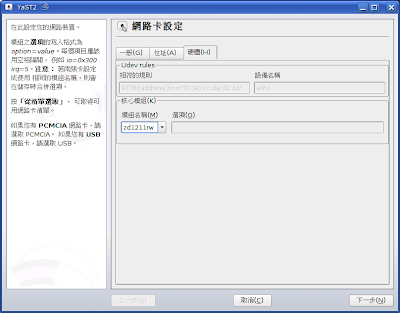
下次就會再您插入這支網卡時自動載入 zd1211rw
根據網路上查到的資料可以使用 zd1211rw 這個驅動程式模組
但是型號尚未加進去
所以我們要自己動手編譯
1. 先安裝核心原始碼,在 openSUSE 中,這個套件就叫做 kernel-source
在光碟中就有,但是您一定已經升級了 kernel
這時應該由 update source 中來安裝相對應的 kernel-source
我們還需要 zd1211-firmware
# zypper in kernel-source zd1211-firmware
2. 您還需要其他的編譯工具,至少您需要 gcc 和 make
# zypper in gcc make
3. 將網卡插入 USB 中,用 lsusb 看看您的型號
(lsusb 在 usbutils 套件中)
# lsusb
Bus 004 Device 001: ID 0000:0000
Bus 003 Device 001: ID 0000:0000
Bus 005 Device 003: ID 2019:ed01
Bus 005 Device 001: ID 0000:0000
Bus 002 Device 001: ID 0000:0000
Bus 001 Device 001: ID 0000:0000
我們知道這張網卡就是 2019:ed01
4.修改 /usr/src/linux/drivers/net/wireless/zd1211rw/zd_usb.c
依照裏面的列表模式將
{ USB_DEVICE(0x2019, 0xed01), .driver_info = DEVICE_ZD1211B },
加入
5. 重新編譯
# cd /usr/src/linux
# make clean
# make oldconfig
# make scripts
# make prepare
# cd drivers/net/wireless/zd1211rw
# make -C /lib/modules/`uname -r`/build/ M=`pwd` modules
# make -C /lib/modules/`uname -r`/build/ M=`pwd` modules_install
6. 重新開機,開啟終端機
# modprobe zd1211rw
7. 此時再插入 GW-US54GD
就會偵測到新網卡,若您使用 NetworkManager
此時再 NetworkManager 圖示上按右鍵就可以切換成無線網路了
8. 如果您希望插上此網卡時自動載入 zd1211rw 模組
您可以用 YaST 設定網卡,在模組名稱中填入 zd1211rw
下次就會再您插入這支網卡時自動載入 zd1211rw
訂閱:
文章 (Atom)